Revamping OneLink: Asset Management for P&C Insurance Agents
Overview
Role: Product Designer (Lead Designer)
Company: Intruity Corporation
Timeline: 2022
Product: OneLink CRM
Intruity Corporation is a technology company specializing in innovative CRM and AMS solutions tailored for the insurance industry, designed to streamline operations and enhance business efficiency for large agencies, FMOs, and call centers.
OneLink is an all-in-one insurance CRM, originally built for Health & Life insurance agents, that helps agencies manage their leads, clients, policies, and outreach in one place. This project evolved OneLink into a platform that could also serve Property & Casualty (P&C) insurance agents by introducing a new, configurable asset-management feature.
The Challenge
The Problem
OneLink was built for Health & Life insurance agents, whose work centers on people and policies. Property & Casualty insurance is different: it revolves around real-world insured items such as vehicles, homes, and equipment. OneLink had no way for P&C agents to represent those items as structured records, tie them to the right customer, or carry that data across a customer's profile.
Pain Points:
- No way to model insured items (e.g., a vehicle) as structured records inside the CRM
- Customer and asset data didn't stay reliably tied to the right lead or client
- OneLink's Health & Life data model didn't fit how P&C agents actually work
- A new feature risked feeling like a bolt-on that broke the existing user experience
- P&C agents needed quick adoption with minimal learning curve
The Opportunity
Design a configurable asset-management feature that lets agents define their own asset types with custom properties and attach them to a lead or client, keeping customer data connected and referenceable, and opening OneLink to the entire P&C agent market.
The Research
Understanding the Users
I grounded the work in a comprehensive user-needs analysis, seeking to understand how P&C agents work, the processes they follow, and the unique needs that conventional CRMs were not meeting.
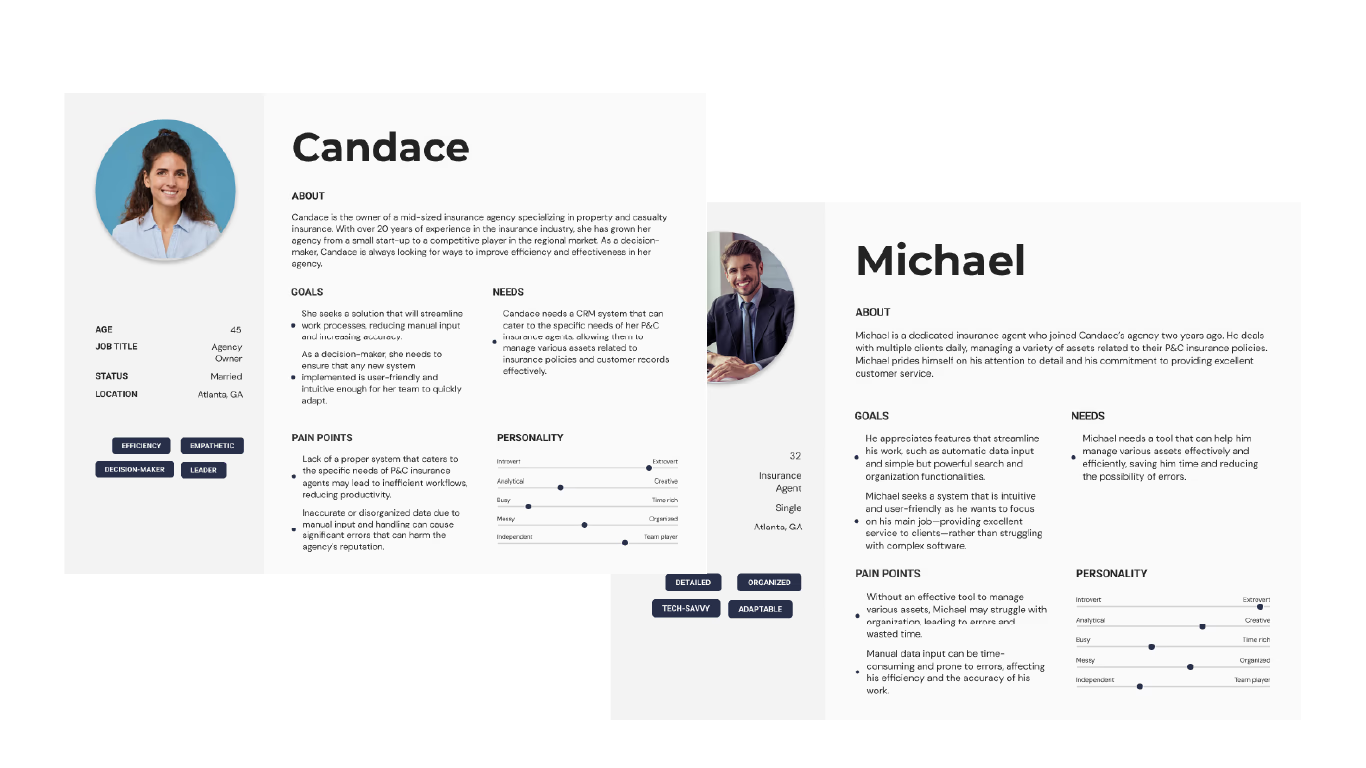
Candace: P&C Insurance Agency Owner
A decision-maker with 20+ years in insurance who needs a CRM her team can adopt quickly. She wants to manage policy- and customer-related assets effectively, reduce manual input, and increase accuracy, without a steep learning curve.
Michael: P&C Insurance Agent
A detail-oriented agent who manages many clients and their assets every day. He wants automatic data entry, simple but powerful search and organization, and an intuitive tool that keeps him focused on serving clients rather than fighting software.
Research Activities
User Needs Analysis
Studied how P&C agents work to understand the data they manage and how assets relate to leads, clients, and policies.
Persona Development
Built the agency-owner and agent personas to keep two distinct sets of needs in view throughout design.
Cross-Functional Flow Mapping
Worked with the development team to map the feature's user flows before design, aligning on how agents would create, configure, and associate assets.
Key Insights
P&C agents don't think in files; they think in things they insure. The feature had to model real-world assets as flexible records tied to a customer, not as documents in a library.
Finding 1: Assets had to be configurable, since every agency insures different kinds of items with different attributes
Finding 2: Data had to stay tied to the customer across the lead and client stages of their profile
Finding 3: The flow had to be easy to adopt and consistent with OneLink's existing experience
Finding 4: Agents valued speed and accuracy, favoring simple selection and minimal manual entry
User Flow Mapping & Prototyping
Defining the Experience
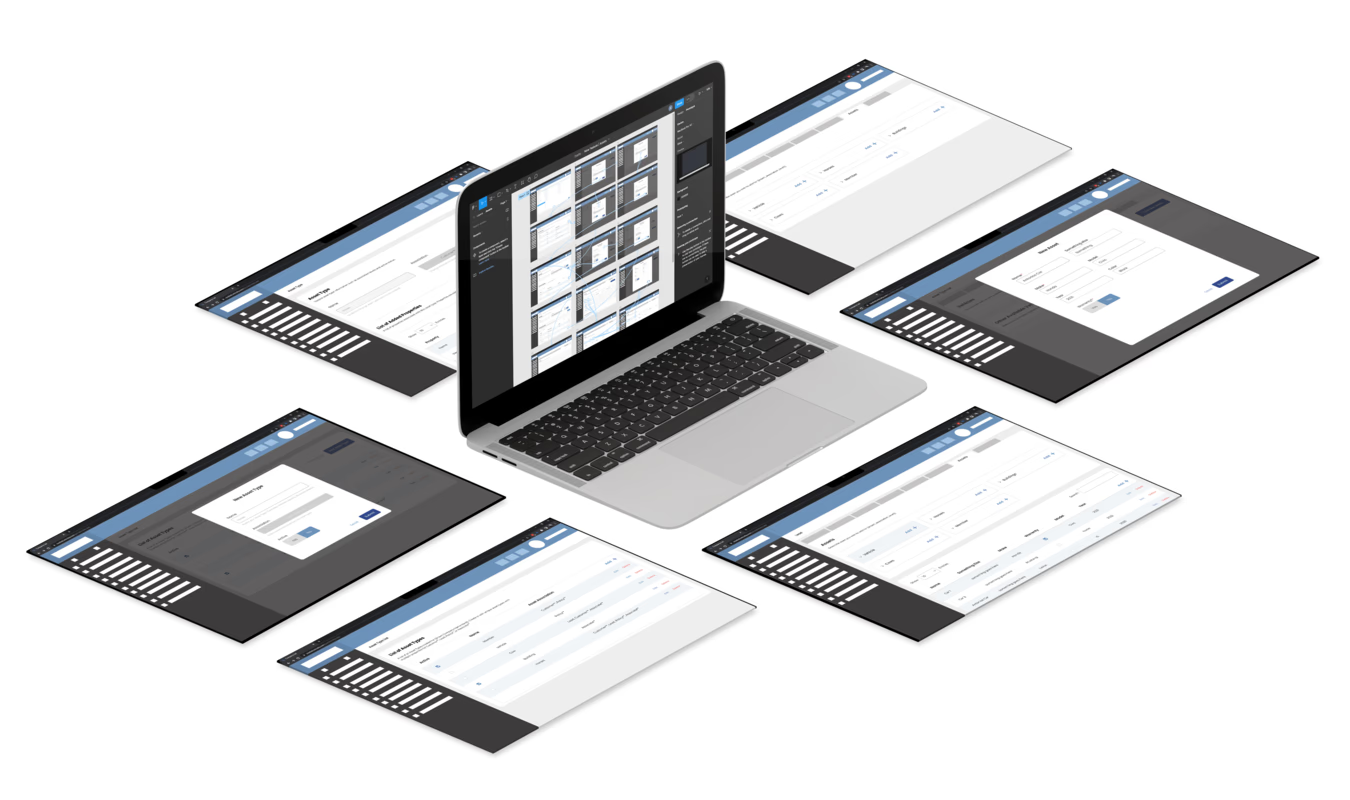
Drawing from the research, I worked with the development team to map the user flows, then built wireframes and prototypes to shape the design and surface points of friction before any code was written.
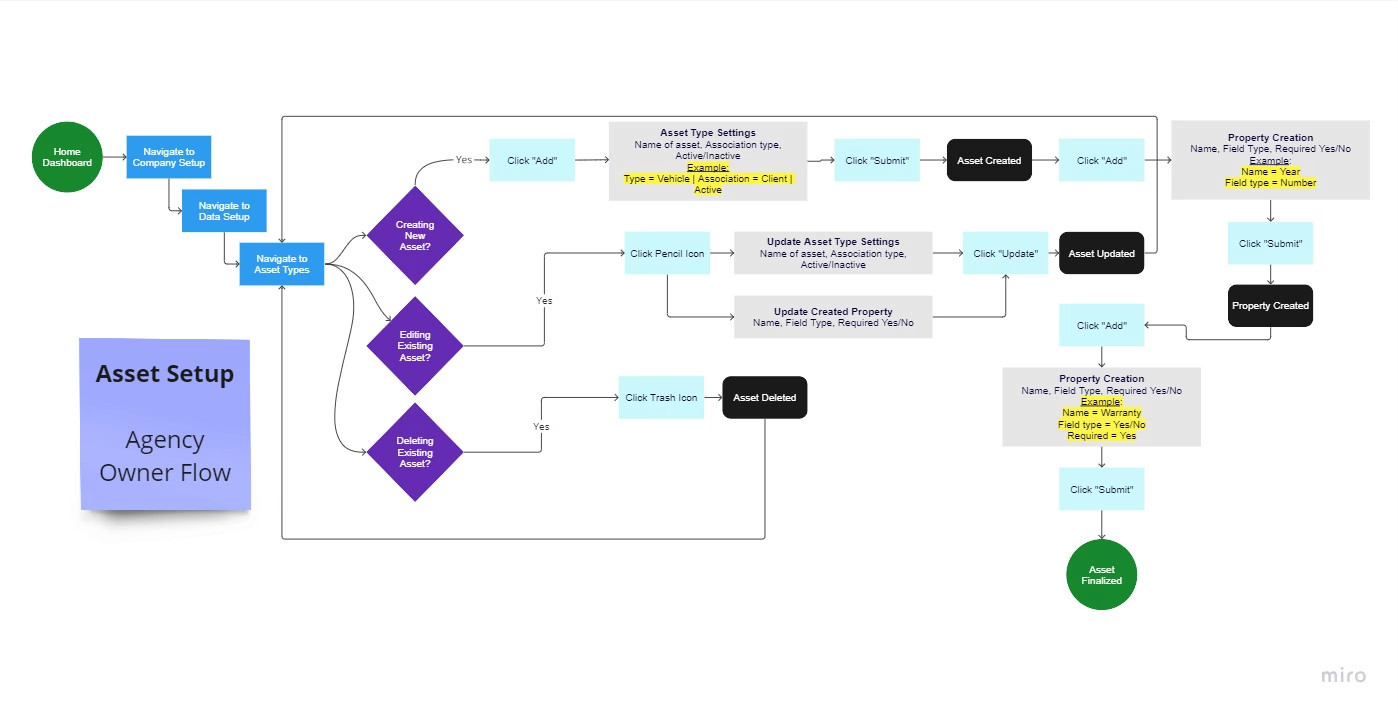
Key User Flows:
- Create an asset and tie it to a customer (agent): from the dashboard, find the lead or client, open the Assets tab, create or select an asset, define its properties (e.g., Make, Model, Year, Cost), and associate it with the customer's account
- Configure asset types (agency owner): from Company Setup, move to Data Setup, then Asset Types, to create an asset type by naming it, choosing its association (e.g., Client), and setting it Active
- Define custom properties: add as many properties as an asset needs (e.g., Name = Year, Field Type = Number, Required = Yes), so the model fits any kind of insured item
- Manage assets: create, edit, or delete asset types as the agency's needs change
Design Decisions
Start From the Dashboard
The flow begins where users actually land at login, reinforcing familiarity and keeping agents oriented within the app.
Sequential, Low-Cognitive-Load Steps
Defining an asset's type, association, and status first gives users a broad understanding before they dive into specific properties.
Flexible Property Creation
A generic property-creation flow lets a single system support a wide variety of assets, rather than hard-coding fields for one use case.
A Confirmation Step
A clear submit step prevents errors and gives users a sense of completion.
The throughline was to minimize complexity, enhance user control, and support different asset types while keeping the flow consistent and predictable.
The Issues to Overcome
Challenge 1: Integrating Into an Existing Product
Problem: The feature had to slot into a CRM originally designed for a different user base without breaking the existing experience.
Solution: Anchored the flow in OneLink's established patterns (starting at the dashboard, reusing familiar navigation) so the addition felt native rather than bolted on.
Challenge 2: Diverse and Nuanced P&C Needs
Problem: P&C agents insure many different kinds of items, each with its own attributes, so a fixed set of fields would never fit.
Solution: Designed a configurable model where agencies define their own asset types and properties, letting one system serve many use cases.
Challenge 3: Ease of Use and Quick Adoption
Problem: Agents needed to adopt the feature quickly with minimal training.
Solution: Used a sequential, predictable flow with a confirmation step, reducing cognitive load and keeping the experience consistent with the rest of OneLink.
The Results
The launch introduced a new, configurable way to manage field data inside OneLink, tailored to P&C agents.
Adoption & Growth
- Positive reception from P&C agents, who valued a design built around their specific needs
- Steady growth in OneLink's P&C user base since launch
New Market Reach
- The feature's flexibility drew interest from clients in entirely different industries (for example, Motocross) who wanted the same field-management model
- Existing and new clients began requesting refinements to extend the feature's flexibility
A New Foundation
The asset feature paved the way for a new form of field management within OneLink, turning a single P&C capability into a flexible system other industries could adopt.
Lessons Learned
What Worked
✅ User-Centered Approach: Grounding the work in a real user-needs analysis kept the design aligned to how P&C agents actually work
✅ A Configurable Model: Designing for flexibility, rather than one fixed asset type, is what let the feature expand into new use cases and industries
✅ Iterative Process: Refining flows from continuous cross-functional feedback and user testing kept the design honest
What I'd Do Differently
🔄 Earlier Usability Testing: I'd formalize structured usability testing earlier, validating the configuration flow with more agents before build
🔄 Document the Data Model Sooner: Aligning with engineering on the asset/property data model earlier would have smoothed handoff
🔄 Plan for Extensibility Up Front: Given how quickly other industries wanted the feature, I'd scope extensibility into the first version rather than retrofitting it
Key Learnings & Future Influence
This project shaped how I approach product design:
Design Flexible Systems
The most valuable decision was making assets configurable rather than fixed. Designing systems that users can shape to their own needs unlocks reach you can't predict up front.
Designing for a New Segment Inside an Existing Product
Extending a product to a new user base is as much about respecting the existing experience as it is about serving the new one. Familiarity and consistency drove adoption.
Product Thinking Over Pixels
The hardest, most impactful work was the data model and the flow, understanding how P&C agents think about the things they insure, not visual polish. This reinforced my approach: start with the user's mental model, validate with real users, and design for adaptability.
Visit OneLink
🎥 Product Video: youtu.be/7oTqPL68sCs
This project represents my approach to enterprise product design: understanding a new user segment, designing flexible systems that fit real workflows, and iterating toward measurable adoption.